
Parallels released the RAS 22 Technical Preview on 18 September 2026. Security is the headline theme, but there's plenty for Mac users and day-to-day administrators too. Here's our field view of what's coming and what to test first.
Note: RAS 22 is in Technical Preview. Features may change before general availability, and AVD Hybrid depends on Microsoft's AVD Hybrid availability.
Security: trust the device, not just the user
Client device posture checks. Knowing who signed in doesn't tell you whether their device is safe. RAS 22 can check devices against requirements such as antivirus status and approved OS or browser versions before granting access. Checks continue after login, so admins keep a current view of compliance across the environment. For organisations with contractors and BYOD users, this closes a real visibility gap.
Public IP access control. Policies can now be applied based on where a connection actually comes from. An external contractor might need extra verification, while an internal connection follows a lighter path.
Other security changes:
- SAML as a second factor for MFA
- Gateway hardening and API rate limiting to withstand high volumes of connection attempts
- Trusted farm verification, so untrusted servers can't join the RAS environment
- An updated SAML design with underlying security improvements
- Session tunnelling for Linux and iOS/iPadOS clients
- Experimental session recording and playback for audits and incident investigations
Files in the User Portal
RAS 22 adds a Files area to the User Portal. Users browse existing SMB file shares alongside their apps and favourites, then open a file straight into the right application. There's no separate file client and no new file infrastructure to deploy.
AVD Hybrid: the AVD experience on your own infrastructure
With AVD Hybrid support planned for RAS 22, organizations will be able to use Microsoft's Azure Virtual Desktop experience, including the Windows App with Teams optimization, while keeping desktops and data on their own hypervisor. RAS provides management for those on-premises resources, aiming for one console across Azure-hosted and on-premises desktops.
For Canadian organizations with strict data residency requirements or existing datacenter investment, this is one of the most interesting additions in the release.
A more natural Mac experience
- True Coherence mode: published remote apps behave like local Mac apps and sit naturally in the Dock, with live window previews
- Transparent image copy between RAS sessions and macOS
- Clearer permission prompts when sharing a local Mac drive with read/write access
Fixes for everyday session friction
- Unified keyboard layout sync carries local layout changes into the session, useful for users switching input methods such as Korean or Japanese
- Time zone redirection without the RDS role or extra server configuration
- UI configuration for redirected drive write caching
- Clearer password expiry notifications
For RAS administrators
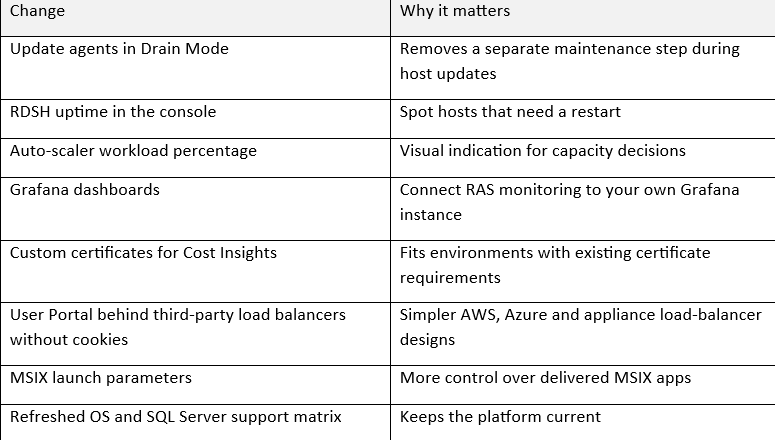
What we'd test first
- Device posture checks with a contractor or BYOD user group
- SMB file access with a team that lives in shared drives
- Coherence mode with your Mac users
- The load balancer change if you run RAS behind AWS or Azure load balancers
How XenTegra helps
As a Parallels Platinum Partner in North America and a Parallels Gold Distributor in India, XenTegra runs early access labs for new RAS releases. We can help you evaluate the RAS 22 Technical Preview in an isolated lab and plan your upgrade path to general availability.
Call to action: Want to see RAS 22 in action? Book a RAS 22 preview session with XenTegra Canada.