
Running Parallels RAS on Amazon Web Services gives you elastic capacity, a choice of Canadian regions and managed infrastructure services around your desktops. The part that trips up most first deployments is the front door: how client traffic reaches the RAS Secure Gateways. This guide covers the reference architecture we use and the load-balancer configuration that makes it work.
Reference architecture
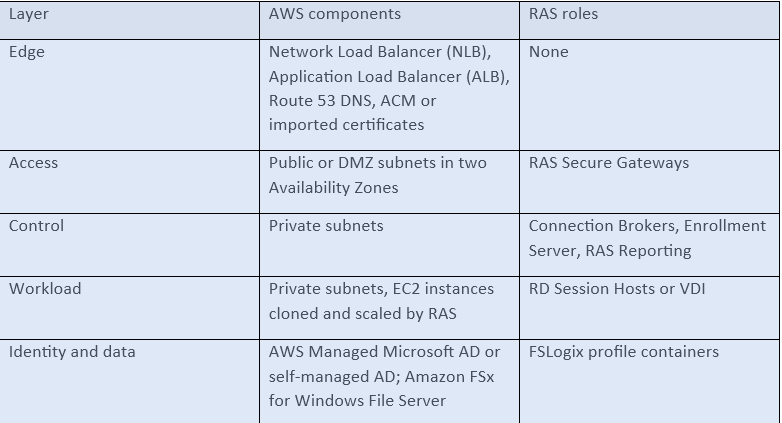
For Canadian data residency, deploy in AWS Canada (Central) or Canada West (Calgary), and use the other region for disaster recovery.
Why two load balancers?
Parallels RAS clients use two kinds of traffic. Native Parallels Clients connect over TCP, while the User Portal and HTML5 Web Client use HTTPS. AWS load balancers don't support both protocols on the same port, so the design splits them:
- NLB handles native Parallels Client connections (TCP)
- ALB handles the User Portal and HTML5 connections (HTTPS)
If all your users run the native client, an NLB alone is enough. As soon as you offer browser access, you need both.
Step 1: Add AWS as a provider in RAS
In the RAS Console, go to Farm, then Providers, and add Amazon Web Services with credentials scoped to the RAS resources. RAS can then deploy its agent to EC2 instances, build templates from a golden image and clone session hosts on demand.
Step 2: Configure Network Load Balancers access in RAS
In the Secure Gateway properties (or the site defaults, to apply it to every gateway), open the User Portal settings and configure Network load balancers access:
- Use alternate hostname: the DNS name native clients use to reach the NLB
- Use alternate port: a port not used by any other RAS component
This separates the hostname and port for TCP traffic from the HTTPS entry point the ALB serves.
Step 3: Create the target groups
Create one target group for the NLB (TCP) and one for the ALB (HTTPS), each pointing at the Secure Gateway instances. Then edit each target group's attributes and change the deregistration delay from the default 300 seconds to 0, so draining gateways stop receiving connections immediately.
Step 4: Configure the ALB for the User Portal
The ALB routes browser sessions and needs sticky sessions so each user stays on the same gateway. The ALB manages this with its own generated cookie (AWSALB). Enable stickiness on the target group, attach your certificate to the HTTPS listener and point the listener at the ALB target group.
If you use web authentication with an identity provider, RAS 21.1 added ALB server and port settings to the Parallels Client for Windows. This lets the User Portal and the Windows client share the same IdP configuration when the NLB and ALB use different entry points.
Step 5: Configure the NLB for native clients
Create a TCP listener on the alternate port you set in Step 2, attach the NLB target group and configure health checks against the gateways. Publish the alternate hostname in DNS.
Step 6: Test both paths
Test from inside the VPC first, then externally:
- Native Parallels Client using the NLB hostname and port
- User Portal in a browser using the ALB hostname, launching an HTML5 session
- User Portal launching the native client
- Failover: stop one gateway and confirm new sessions land on the other
Design notes and gotchas
- Multi-tenant deployments: the alternate hostname and port approach isn't suitable when Tenant Broker Secure Gateways are shared between tenants. Plan a dedicated front end per tenant or use RAS HALB instead.
- HALB as an alternative: RAS High Availability Load Balancing runs in your VPC and can handle both traffic types. Choose AWS ELB when you want a managed service, and HALB when you want RAS-native control.
- RAS 22: the RAS 22 Technical Preview removes the cookie configuration previously needed to run the User Portal behind third-party load balancers. Revisit your ALB design when RAS 22 reaches general availability.
- Cost: use RAS autoscaling to power session hosts on and off with demand, and size gateways on peak concurrent connections.
How XenTegra helps
XenTegra is a Parallels Platinum Partner in North America and has designed RAS environments across AWS, Azure, Hyper-V and VMware. We can design, build and document a production-ready RAS on AWS deployment, including load balancing, identity, profiles and disaster recovery.
Call to action: Planning RAS on AWS? Book an architecture review with XenTegra Canada.