
Most work now happens in a browser. SaaS apps, internal web portals and partner sites all run there, and so do phishing pages, malicious downloads and data exfiltration. Parallels Browser Isolation (PBI) tackles this by moving the risky part of browsing off the device entirely. This post walks through how the architecture works and how to design a rollout.
The core idea: remote browser isolation
With PBI, web applications don't run on the user's device. They run in a separate, secure browser container in the cloud. The user interacts with the app from their own browser, but only safe, permitted content is streamed back. Malicious code, scripts and downloads stay in the container, creating an air gap between the user's browsing and your corporate network.
Architecture at a glance
PBI is designed as an agentless gateway, so there's nothing to install on endpoints. The flow looks like this:
- The user signs in to the PBI portal and launches a published web or SaaS application.
- PBI starts an isolated browser container in the cloud and applies the user's policies.
- The container loads the application and renders it in isolation.
- Only safe, permitted content streams back to the user's own browser.
- Every action is logged for real-time and historical insight.
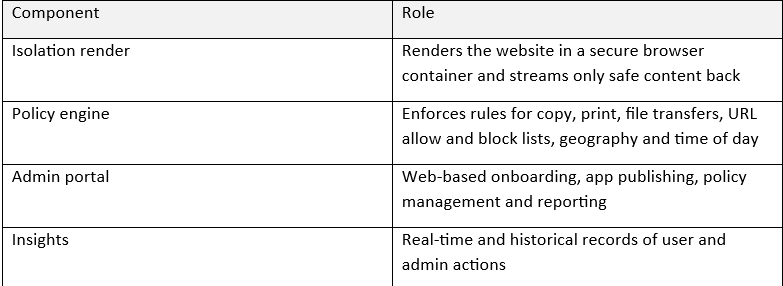
Because PBI is cloud-delivered and built on Zero Trust principles, identity is verified continuously rather than trusted once at login.
The policy engine: controlling data movement
Isolation stops threats coming in. The policy engine controls data going out. Admins can:
- Allow or block copy and paste between the isolated app and the local device
- Control printing from isolated sessions
- Restrict file uploads and downloads
- Allow trusted domains and block URLs
- Filter access by geography or time of day
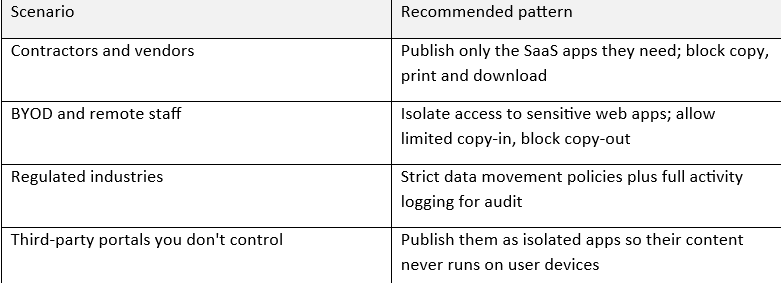
This is what makes PBI practical for contractors and regulated data. A vendor can work in your CRM or ticketing system without being able to copy customer records to their laptop.
Design patterns
PBI and Parallels RAS together
PBI and RAS solve different halves of the same problem:
- Parallels RAS delivers Windows applications and full desktops from infrastructure you control
- Parallels Browser Isolation secures web and SaaS applications through the browser, with no infrastructure to run
Many organisations use RAS for line-of-business Windows apps and PBI for the growing list of SaaS tools, giving users one secure way of working across both.
Rollout in four steps
Parallels positions PBI as a quick setup, often within about ten minutes for a first session:
- Register an account and open the admin portal
- Configure security policies and publish applications
- Invite users
- Users launch secure sessions to their published apps
For a production rollout, add a pilot group, agree data movement policies with security and compliance teams, and review the activity insights after the first two weeks.
Licensing
PBI is sold as an annual subscription with named-user licensing and a 15-user minimum. Parallels lists an MSRP of USD 19 per user per month on a one-year term. Contact XenTegra for Canadian and partner pricing.
How XenTegra helps
XenTegra designs PBI policies around your real use cases, integrates it with your Parallels RAS environment, and helps security teams turn the activity data into audit-ready reporting.
Call to action: Securing contractor or SaaS access? Book a Parallels Browser Isolation pilot with XenTegra Canada.