Omnissa Horizon can run in your own datacentre, in the public cloud, or across both. Each model has real strengths, and the right choice depends on your infrastructure lifecycle, your workloads and how your team wants to operate. Here’s how we help clients compare them.
The deployment models
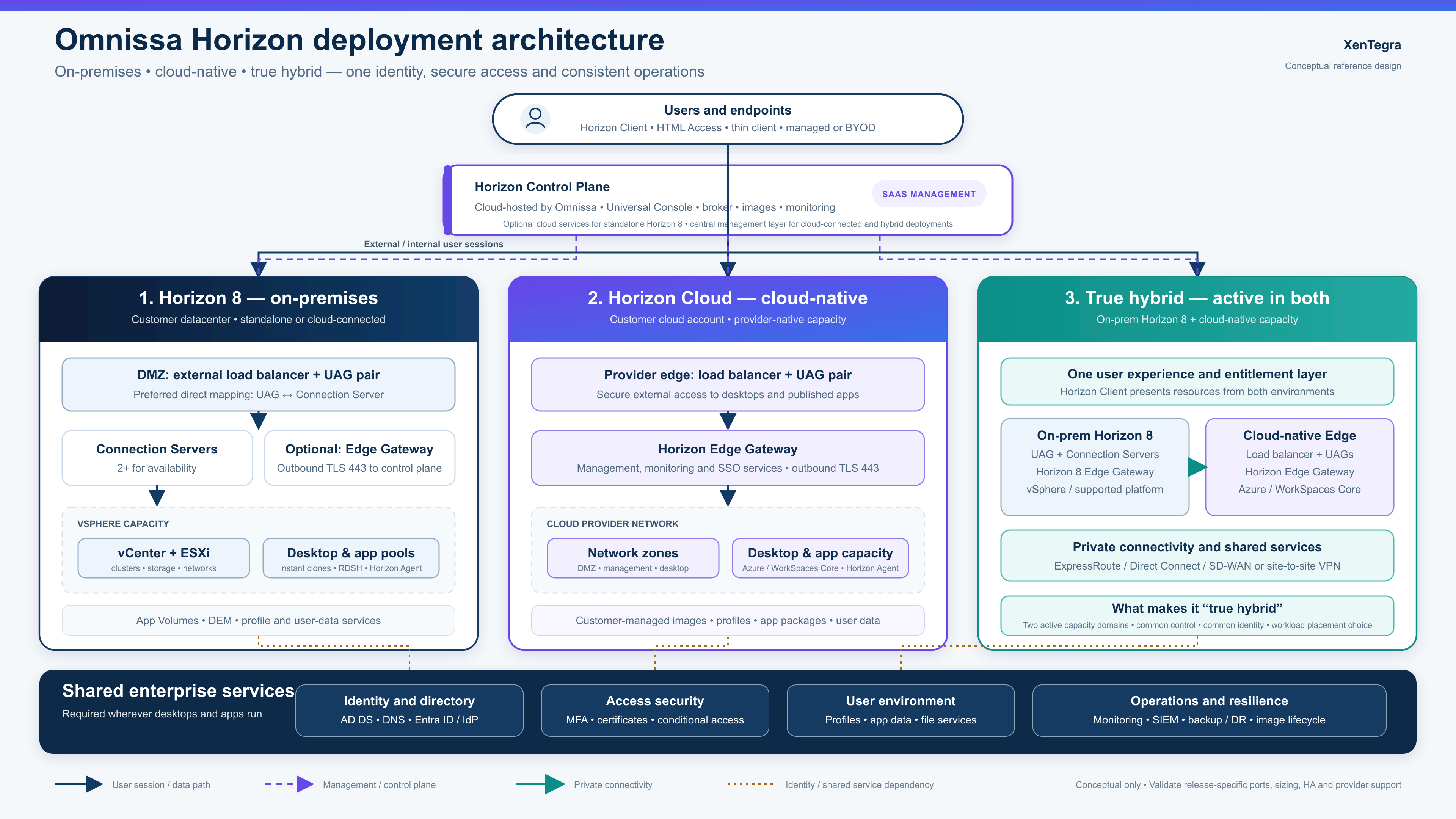
Horizon on-premises. Connection Servers, Unified Access Gateways and desktop pools run on your own vSphere infrastructure. You control everything, and you own the hardware lifecycle.
Horizon on Azure (native). Horizon capacity runs on native Azure virtual machines, with the Horizon control plane managing desktops and apps. You pay for Azure consumption and avoid buying hardware.
Horizon on a cloud-hosted vSphere platform. Horizon runs on vSphere hosted in a public cloud, such as Azure VMware Solution. This is often used to extend an existing on-premises design into the cloud with minimal change.
Hybrid. A mix of the above, for example keeping steady workloads on-premises and using cloud capacity for disaster recovery, seasonal peaks or new offices.
How they compare
On-premises
- Upfront cost: High (hardware)
- Ongoing cost: Predictable
- Control: Full
- Scalability: Limited by hardware
- Operational effort: Highest
- Best fit: Recent hardware, strict control needs
Native Azure
- Upfront cost: Low
- Ongoing cost: Consumption-based
- Control: Shared
- Scalability: Elastic
- Operational effort: Lower
- Best fit: Cloud-first, variable demand
Cloud-hosted vSphere
- Upfront cost: Medium
- Ongoing cost: Higher, committed
- Control: High
- Scalability: Elastic in host blocks
- Operational effort: Medium
- Best fit: Fast lift-and-shift
Hybrid
- Upfront cost: Medium
- Ongoing cost: Mixed
- Control: High
- Scalability: Elastic where needed
- Operational effort: Medium to high
- Best fit: Gradual modernisation, DR
Networking and identity considerations
Whichever model you choose, three areas need early attention:
- Connectivity: cloud-hosted desktops need reliable links back to on-premises apps and data. Plan ExpressRoute or site-to-site VPN capacity based on real traffic.
- Identity: decide how Active Directory, Microsoft Entra ID and your MFA provider fit together, especially for hybrid deployments.
- Data location: keep profiles and user data close to where desktops run, and in Canadian regions where residency matters.
Planning a move from on-premises to cloud
- Assess current pools, images, usage and dependencies.
- Choose the target model per workload, since not everything has to move.
- Pilot one pool in the cloud with a representative user group.
- Migrate in waves, keeping on-premises capacity as a fallback.
- Retire or repurpose on-premises hardware when its refresh date arrives.
Our recommendation framework
- If your hardware was refreshed recently and demand is stable, stay on-premises and revisit at the next refresh.
- If a hardware refresh is due within 18 months, evaluate native cloud seriously.
- If you need to move quickly with minimal redesign, consider cloud-hosted vSphere.
- If you have mixed workloads or DR gaps, go hybrid.
How XenTegra helps
XenTegra designs and delivers Horizon environments across on-premises, Azure and hybrid models, and our multi-vendor experience means we’ll tell you if another platform would suit you better. We’ll assess your estate, model the costs and help you choose the deployment that fits.
High Level Architecture Diagram:
Weighing up Horizon in the cloud? Book a Horizon deployment assessment with XenTegra Canada.