
OpenStack powers many private clouds, research platforms and sovereign cloud services, including providers that keep data entirely within Canada. Until recently, running Parallels RAS on OpenStack meant managing session hosts by hand. The Custom Provider Framework (CPF), introduced in Parallels RAS 21.2 in June 2026, changes that. It lets you connect RAS to platforms without a built-in provider, so RAS can provision, clone and power-manage VMs there just as it does on Hyper-V, VMware, Nutanix, Azure or AWS.
This post covers how a CPF connector for OpenStack works and how to build and validate one.
Important: Parallels publishes an official sample connector for Proxmox, but not for OpenStack. An OpenStack connector is a custom integration that you (or your partner) build, test and support, under the framework's shared-responsibility model.
How the Custom Provider Framework works
A custom provider is a script that sits between RAS and your platform. RAS sends requests to the script using a standardised JSON protocol, and the script calls the platform's API and returns the result. Connectors can be written in PowerShell, Python or a similar scripting language.
The connector implements a defined set of operations:
- Onboarding and connection to the platform
- VM enumeration and guest information retrieval
- Power operations (start, stop, restart)
- Template promotion and versioning
- Cloning new VMs from templates
Mapping RAS operations to OpenStack
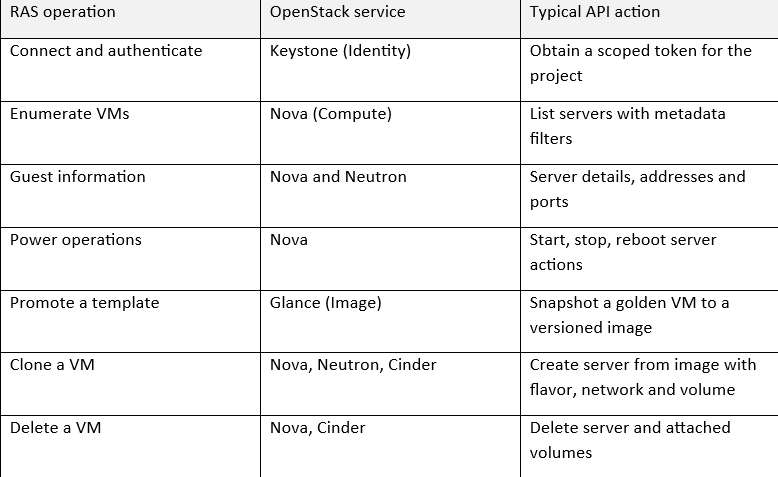
Use Nova server metadata or tags to mark which instances RAS owns. That keeps enumeration fast and avoids touching unrelated workloads in the same project.
Step 1: Prepare the OpenStack project
- Create a dedicated project for RAS workloads with quotas sized for your session hosts
- Create a service account with only the roles the connector needs
- Define flavors for session host sizes (for example 4 vCPU/16 GB and 8 vCPU/32 GB)
- Create provider or tenant networks with routes to Active Directory and your RAS infrastructure servers
Step 2: Build a Windows golden image
Windows guests on OpenStack need a few extras:
- VirtIO drivers for storage and network performance on KVM
- Cloudbase-Init, the Windows equivalent of cloud-init, to handle hostname, networking and first-boot tasks
- The RAS agent and your applications, plus FSLogix
- Sysprep before capturing the image into Glance
Confirm your Windows Server licensing model for the OpenStack platform, as this varies between private clouds and service providers.
Step 3: Build the connector
Start from the basic skeleton and test harness in Parallels' RAS-PowerShell GitHub repository, then implement each operation against the OpenStack APIs. Keep the connector stateless: every request should authenticate (or reuse a valid token), act, and return a clear result or error to RAS.
Step 4: Test outside RAS first
Use the CPF test kit to run each operation directly against a lab project before connecting RAS. Test error handling deliberately: quota exceeded, image missing, network unavailable and API timeouts. A connector that fails cleanly is far easier to support than one that fails silently.
Step 5: Register the provider in RAS
Add the custom provider in the RAS console, point it at your connector, and create a template from the golden image. Then build a host pool and let RAS clone session hosts, join them to the domain and bring them into load balancing.
Step 6: Operate it
- Monitor connector logs alongside RAS logs
- Version-control the connector and test every change in a lab first
- Recheck the connector when OpenStack or RAS is upgraded
When OpenStack makes sense for RAS
- Sovereign and regulated workloads that must stay on Canadian-owned infrastructure
- Existing OpenStack investment in research, education or telecoms
- Service providers building DaaS on open infrastructure
- Reducing hypervisor licence dependence without giving up RAS automation
How XenTegra helps
XenTegra designs multi-datacentre and multi-tenant RAS platforms and can build, test and document a CPF connector for your OpenStack environment, with Canada-led architecture and India-based technical delivery.
Call to action: Running OpenStack? Talk to XenTegra Canada about a RAS on OpenStack proof of concept.