Microsoft now offers two ways to put Windows in the cloud, and increasingly groups them under the umbrella term Windows Cloud. Azure Virtual Desktop (AVD) and Windows 365 both deliver a Windows desktop from Azure and both use the Windows App. But they're built for different operating models, and choosing the wrong one means paying for capacity you don't use or under-serving users who need flexibility.
The one-line difference
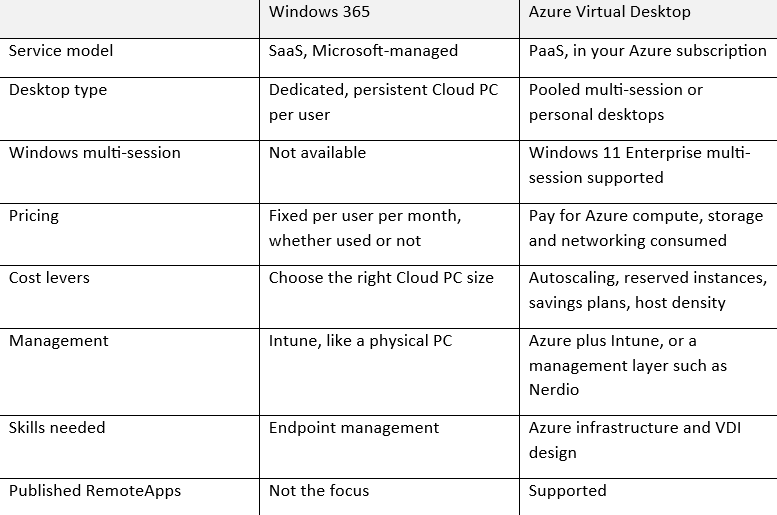
Windows 365 is a SaaS Cloud PC: one dedicated, persistent desktop per user for a fixed monthly price, with Microsoft running the infrastructure.
AVD is a platform you build: consumption-based infrastructure in your own Azure subscription, with pooled multi-session hosts, autoscaling and full architectural control.
Side-by-side comparison
Licensing prerequisites
- AVD: user access rights are included with Microsoft 365 E3/E5, Business Premium and Windows Enterprise E3/E5. You pay only for the Azure infrastructure.
- Windows 365 Enterprise: users need Windows Enterprise, Intune and Microsoft Entra ID P1, typically through Microsoft 365 E3/E5.
- Windows 365 Business: designed for smaller organisations, capped at 300 users per tenant, without the same enterprise licence requirements.
What changed in 2026
On 1 May 2026, Microsoft cut Windows 365 Business list prices by about 20%. For dedicated desktops that run all day, Windows 365 Business is now often cheaper than an equivalently sized Azure VM on a reserved instance. Windows 365 Enterprise pricing didn't change and sits at rough parity with reserved Azure VMs.
AVD still wins when users don't need a desktop around the clock, or when several users can share one multi-session host. The more you can pool and scale down, the bigger AVD's advantage.
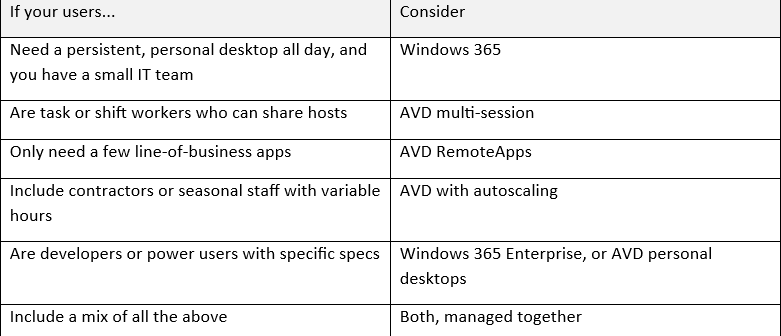
Decision guide
Running both
Many organisations end up with both: Windows 365 for executives and knowledge workers who want a dedicated PC experience, and AVD for pooled task workers and app delivery. Management tools such as Nerdio can manage both from one console, which keeps images, policies and reporting consistent.
And if some desktops must stay on your own hardware, keep an eye on AVD Hybrid. Parallels RAS 22 plans to support it, bringing the AVD experience to on-premises infrastructure, subject to Microsoft's availability.
Canadian considerations
Both services can run in Canada Central (Toronto) and Canada East (Quebec City). Confirm the region for every component, including profiles and backups, and document it for privacy and compliance reviews.
How XenTegra helps
XenTegra's Managed DaaS service is built on Azure Virtual Desktop and Nerdio for Canadian SMBs, and we advise on Windows 365 where it's the better fit. We'll model both options against your real usage data and give you a clear recommendation.
Call to action: Not sure which fits? Book an AVD vs Windows 365 assessment with XenTegra Canada.