
The question
"Citrix just published another critical NetScaler bulletin. We only finished patching a couple of weeks ago. Are we exposed again, and do we really need another change window?"
The short answer
If your NetScaler does SAML, yes. CVE-2026-107406 is a critical memory overflow that can lead to remote code execution, and it reaches builds that many teams consider freshly patched.
Three things decide your exposure, and you can check all of them in about ten minutes:
- Is the appliance customer-managed?
- Is it configured as a SAML service provider (SP) or SAML identity provider (IdP)?
- Which build is it running?
If the answers point to "affected," plan the upgrade to 14.1-73.46 or 13.1-64.29 now. Treat it as an emergency change, not a next-quarter item.
What Citrix disclosed
Citrix security bulletin CTX697191 rates this one Critical. Here is the bulletin in one table.
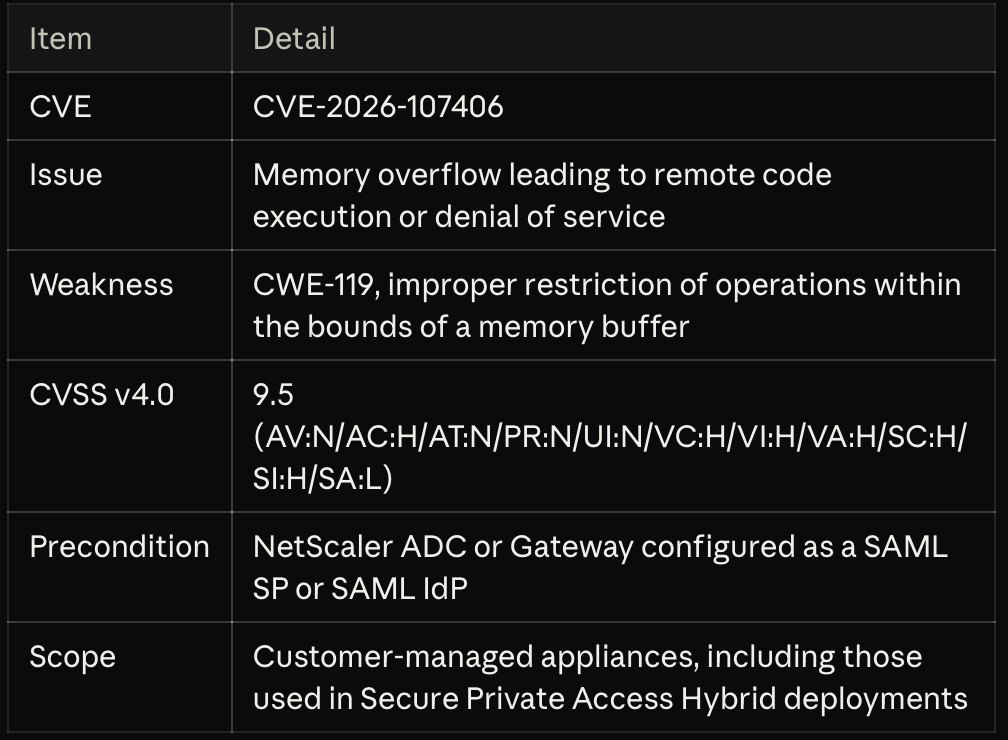
Read the vector the way an attacker would. It is reachable over the network, needs no credentials and needs no user to click anything. The only moderating factor is high attack complexity, and that is not a control you own.
The subsequent-system scores matter too. Citrix rates the impact on systems behind the appliance as high for confidentiality and integrity. A compromised NetScaler is a foothold into whatever it fronts.
The bulletin lists no workaround or configuration mitigation. The fix is the upgrade.
Are you affected? A ten-minute check
Step 1: Who manages the appliance? The bulletin applies to customer-managed NetScaler ADC and NetScaler Gateway. Cloud Software Group is upgrading Citrix-managed cloud services and Citrix-managed Adaptive Authentication itself. If you run Secure Private Access in a hybrid model with your own NetScaler instances, those instances are yours to patch.
Step 2: Is SAML configured? Citrix says to look for either of these entries in the configuration. From the NetScaler CLI:
show ns runningConfig | grep "add authentication samlAction"
show ns runningConfig | grep "add authentication samlIdPProfile"
A samlAction entry means the appliance acts as a SAML SP. A samlIdPProfile entry means it acts as a SAML IdP. Check every appliance, including HA secondaries, DR pairs and any test instance that is reachable from outside.
Step 3: Which build? Run show version and compare against this table.

No SAML entries on a customer-managed appliance means this CVE's precondition is not met. Record the evidence and move on. You still want to be on a current build.
The trap: "we already patched"
This is the part of the bulletin I would underline. The "IdP only" column starts at 14.1-73.37 and 13.1-64.23. Those are the fixed builds from the late-September NetScaler bulletin, the one covering CVE-2026-88771 through CVE-2026-88778, two of which were reported as actively exploited (IPA alert, September 28, 2026).
So a team that did everything right two weeks ago can be in one of two positions today:
- Patched to 14.1-73.37 or 13.1-64.23 and using NetScaler as a SAML IdP: still affected. You need the newer build.
- Patched to those builds and using NetScaler only as a SAML SP: not affected by this CVE according to the bulletin's version conditions.
If you did not get to the September builds at all, you are affected in either SAML role, and you are also still carrying the September CVEs. One upgrade to the current fixed build closes both.
The SP versus IdP distinction is easy to get wrong in a status meeting. Many environments run both roles on the same appliance: SP toward Entra ID or Okta for Gateway logon, and IdP toward StoreFront, Citrix Cloud or a downstream app. Check the configuration, not the architecture diagram.
What to do this week
Citrix urges affected customers to install the fixed builds as soon as possible. This is how I would run it.
- Inventory. List every customer-managed NetScaler, its build, and whether it has
samlActionorsamlIdPProfileentries. Include FIPS and NDcPP platforms, which have their own fixed builds. - Prioritize by exposure. Internet-facing Gateway and AAA virtual servers that use SAML go first. Internal-only appliances follow in the same change cycle.
- Back up before you touch anything. Take a full configuration backup and confirm you can get back to the current build if the upgrade misbehaves.
- Upgrade the HA pair in order. Secondary first, validate, fail over, then upgrade the old primary. Users see a brief reconnect instead of an outage.
- Test the SAML flows. Sign in through every SP and IdP path after the upgrade: Gateway logon, StoreFront or Workspace launch, and any federated app that depends on the appliance.
- Confirm and document. Run
show versionon both nodes, record the build, and close the item with evidence your security team and auditors can use.
Target builds, straight from the bulletin:
- NetScaler ADC and NetScaler Gateway 14.1-73.46 and later
- NetScaler ADC and NetScaler Gateway 13.1-64.29 and later releases of 13.1
- NetScaler ADC 14.1-FIPS 14.1-73.46 FIPS and later
- NetScaler ADC 13.1-FIPS and 13.1-NDcPP 13.1-37.283 and later
One caution. Do not treat "remove SAML" as a quick mitigation unless you have tested it. On most Gateways SAML is the front door, and pulling it out is a bigger change than the firmware upgrade.
The architect's take
Two critical NetScaler bulletins in about two weeks is not a reason to panic. It is a reason to look at how your environment absorbs an urgent patch.
Your edge appliance is your identity perimeter. SAML on NetScaler sits in front of authentication. A pre-authentication memory flaw there is as serious as it gets, which is why this one scores 9.5. Citrix credits researchers from the JPMorgan Chase XOR Team and Maxim Suhanov for reporting it. The bulletin does not report exploitation in the wild, and I would not plan around that staying true.
Patching speed is a design property. Teams that closed the September bulletin in days had three things: a healthy HA pair, a rehearsed upgrade runbook and a standing emergency change path. Teams that took weeks were usually missing one of them. If this upgrade feels risky, that is the finding.
Know your authentication roles. Few teams can say from memory which appliances act as SP, which act as IdP and which do both. This bulletin turns on exactly that. Write it down once and keep it with the runbook.
Use the tooling you already own. NetScaler Console includes a Security Advisory feature that identifies instances affected by a CVE and supports remediation (NetScaler Console service release notes). If you license Citrix through the Universal Hybrid Multi-Cloud package, check whether Console is already in your entitlement before the next bulletin lands. Most customers are using a fraction of what they pay for.
Subscribe at the source. Citrix publishes these bulletins on its Knowledge Center and offers alerts when one is created or modified. The first person in your organization to hear about a critical CVE should not be hearing it from a news site.
How XenTegra Canada can help
If you want a second set of eyes, our architects can work through this with you:
- Exposure check: confirm build, SAML role and exposure for every NetScaler in your estate, with a written result.
- Assisted upgrade: plan and run the HA upgrade to the fixed build with your team, including SAML flow validation and rollback.
- NetScaler health review: look at HA, backup, change process and Console adoption so the next bulletin is a routine change.
Have a question for a future Ask the Architect? Reach us at www.xentegracanada.com.
Sources
- Citrix security bulletin CTX697191: NetScaler ADC and NetScaler Gateway Security Bulletin for CVE-2026-107406
- IPA alert on NetScaler CVE-2026-88771 and related, September 28, 2026
- NetScaler Console service release notes
This post summarizes a vendor security bulletin as of October 8, 2026. Citrix may update the bulletin. Always confirm affected and fixed builds against the current version before you schedule a change.