
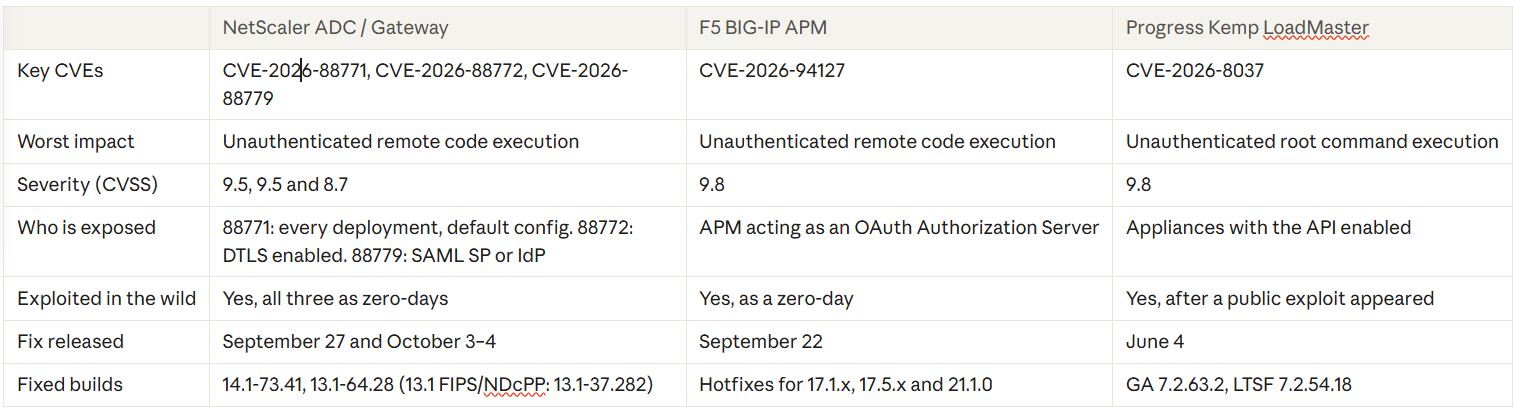
In the two weeks between September 22 and October 4, 2026, both F5 and Citrix shipped emergency fixes for flaws that attackers were already exploiting on internet-facing application delivery controllers (ADCs). NetScaler customers had to patch twice in a week. Kemp LoadMaster is not affected by either vendor's CVEs, but it has its own exploited flaw from earlier this year that many appliances may still carry.
If you run any of these three platforms at your network edge, this post covers what went wrong, how each vendor responded, and what to do this week.
NetScaler: Two emergency patches in a week
What was the issue
On September 27, Citrix published security bulletin CTX697096 covering eight NetScaler ADC and NetScaler Gateway vulnerabilities. Two were already being exploited:
- CVE-2026-88771 (CVSS 9.5): an input validation flaw that lets an unauthenticated attacker run commands on the appliance. It affects every deployment, including the default configuration.
- CVE-2026-88772 (CVSS 9.5): a memory overflow in DTLS handling that can lead to code execution or a crash. DTLS is on by default for VPN virtual servers.
This was not a quiet disclosure. Unit 42 traced fingerprinting of NetScaler appliances back to August 21 and web shell activity through September, weeks before a patch existed. Attackers used both flaws to plant PHP web shells disguised as CSS files and client installer packages.
Then it happened again. On Friday, October 2, admins who had already patched began reporting appliances stuck in reboot loops. Citrix confirmed a third, separate flaw over the weekend:
- CVE-2026-88779 (CVSS 8.7): a memory overflow that crashes appliances configured as a SAML service provider or SAML identity provider. Builds released on September 27 are still vulnerable.
Citrix classifies CVE-2026-88779 as denial of service only. That is disputed. Researcher Kevin Beaumont reported a patched honeypot running a downloaded malware binary, while watchTowr told SecurityWeek it reproduced the bug and found it can only crash systems. Treat it as urgent either way.
What Citrix did
- Released fixed builds for the first eight CVEs on September 27: 14.1-73.37 and 13.1-64.23.
- Published a notice on October 2 acknowledging the new SAML issue, then released a second round of builds on October 3–4 under bulletin CTX697174: 14.1-73.41 and 13.1-64.28, plus 14.1-73.41 FIPS and 13.1-37.282 for FIPS and NDcPP.
- Told customers who upgraded after September 27 to upgrade again if they use SAML.
- Offered Global Deny Lists that block known malicious source IPs as a stopgap.
- Patched Citrix-managed cloud services and Citrix-managed Adaptive Authentication itself. Only customer-managed appliances need action.
CISA added CVE-2026-88779 to its Known Exploited Vulnerabilities catalog on October 4 with a federal deadline of October 7.
What customers can do
- Upgrade to 14.1-73.41 or 13.1-64.28 now, even if you patched last week. These builds include the September 27 fixes.
- Check whether SAML is configured. Search the running config for
add authentication samlAction(SAML SP) oradd authentication samlIdPProfile(SAML IdP). Either one means CVE-2026-88779 applies to you. - Assume the appliance may already be compromised. Exploitation predates the first patch by weeks, and patching does not remove a web shell. Look for:
- A hidden file at
/var/netscaler/logon/LogonPoint/custom/.ctxs.receiver - Unexpected
.debfiles in/vpn/scripts/linux/ php_flag engine onor new Alias lines in/etc/httpd.conf- Requests to
/logon/LogonPoint/Authentication/GetUserNamein access logs pitbossentries inns.logfollowed by shell commands
- A hidden file at
- Preserve evidence before you rebuild. Take a VPX snapshot, a support bundle and a copy of remote syslog first.
- If you cannot patch today, apply the Citrix Global Deny List and reduce internet exposure of the Gateway until you can.
- If you find indicators, isolate the appliance, rebuild from a clean image, and rotate credentials, certificates and keys that passed through it.
Remember that Secure Private Access Hybrid deployments using customer-managed NetScaler instances are in scope too.
F5 BIG-IP APM: a critical flaw in OAuth
What was the issue
On September 22, F5 published advisory K000162605 for CVE-2026-94127 (CVSS 9.8), a heap-based buffer overflow in BIG-IP Access Policy Manager. An unauthenticated attacker can send crafted traffic to a virtual server and execute code on the appliance. F5 confirmed the flaw had already been exploited.
The exposure is narrower than NetScaler's. You are affected only if all of these are true:
- You run BIG-IP APM 17.1.0–17.1.3, 17.5.0–17.5.1 or 21.1.0.
- A virtual server has both an APM access policy and an OAuth profile.
- APM is acting as an OAuth Authorization Server. Deployments using APM only as an OAuth client or resource server are not affected.
F5 says this is a data plane issue with no management plane exposure, and that Appliance mode does not protect against it. No other F5 products are affected. Shadowserver tracks more than 14,700 internet-facing IPs with BIG-IP APM fingerprints, though not all are vulnerable.
What F5 did
- Found the defect internally and disclosed it with fixes available the same day.
- Released engineering hotfixes for the 17.1.x, 17.5.x and 21.1.0 branches.
- Made an iRule mitigation available through F5 Support for customers who cannot patch immediately.
- Published three indicators of compromise so customers can check for prior exploitation.
CISA added the CVE to its Known Exploited Vulnerabilities catalog the same day, with a three-day federal deadline.
What customers can do
- Confirm exposure. List virtual servers that have an OAuth profile attached and check whether APM is the Authorization Server.
- Apply the hotfix for your branch. If you need a change window, open a case with F5 Support and deploy the iRule on the affected virtual server in the meantime.
- Check for signs of compromise, as summarized by CERT-EU. The pattern to look for is all three together:
- Repeated OAuth
invalid_tokenfailures in/var/log/apm, especially ten or more from one IP in a short window - Suspicious commands in
/var/log/auditaround the same timestamps - A TMM core file or SIGABRT shortly afterward
- Repeated OAuth
- Watch the trend. Run
tmctl global_oauth_stat -s total_requests,total_userinfo_requests,total_failedand look for an unexplained rise intotal_failed. - Preserve evidence first if anything looks wrong, then start incident response.
Kemp LoadMaster: not part of this wave, but not in the clear
Is Kemp impacted?
No. The NetScaler and F5 CVEs are specific to those vendors' code, and Progress Kemp LoadMaster does not share it. As of October 6, we found no new Progress advisory tied to the current activity.
LoadMaster had its own version of this story earlier in the year, and it matters if your appliances have not been updated since spring.
What was the issue
CVE-2026-8037 (CVSS 9.8) lets an unauthenticated attacker run commands as root through the LoadMaster API. It affects GA 7.2.63.1 and older and LTSF 7.2.54.17 and older when the API is enabled. A public proof of concept appeared on June 29, and eSentire saw exploitation attempts the same day. CISA added it to the Known Exploited Vulnerabilities catalog on August 7.
What Progress did
- Published its security bulletin and fixed releases on June 4: GA 7.2.63.2 and LTSF 7.2.54.18.
- Fixed a second flaw in the same release, CVE-2026-33691, a WAF bypass in file upload checks.
- Confirmed that MOVEit WAF versions before 7.2.63.2 are affected as well.
Progress did not document a workaround. Patching is the fix.
What customers can do
- Check your firmware version. Anything below GA 7.2.63.2 or LTSF 7.2.54.18 needs an upgrade.
- Check whether the API is enabled and whether the management interface is reachable from the internet. It should not be.
- Treat a long-exposed, unpatched appliance as potentially compromised. The fix has been available for four months and exploitation is confirmed.
- Restrict management and API access to a dedicated admin network, whatever version you run.
Protecting any ADC: what all three incidents have in common
Three vendors, the same lesson. An ADC or gateway sits in front of your authentication, terminates your TLS and is reachable from the internet by design. That makes it the first thing attackers probe and the last thing most teams patch, because an upgrade means downtime.
Regardless of vendor:
- Know what you run. Keep an inventory of every ADC and gateway, its firmware build and which features are enabled (SAML, OAuth, DTLS, API).
- Turn off what you do not use. Each of these flaws needed a specific feature or interface to be reachable.
- Keep management interfaces off the internet. Admin GUIs and APIs belong on a restricted network.
- Send logs off the appliance. Remote syslog is often the only evidence left after a compromise or a reboot loop.
- Have a tested emergency patch process for edge devices, including HA failover, so a same-week upgrade is routine.
- Patch, then hunt. When a flaw was exploited before the fix shipped, a patched appliance can still be a compromised one.
- Subscribe to vendor security bulletins and the CISA KEV feed so you hear about it from the source, not from a reboot.
How XenTegra can help
If you are not sure which build you are on, whether your configuration meets the preconditions, or whether an appliance was touched before you patched, talk to us. XenTegra Canada can help you assess exposure, plan and run the upgrade, and review how your remote access edge is designed.
Sources
- Citrix security bulletins CTX697096 and CTX697174
- BleepingComputer: Citrix confirms two NetScaler RCE zero-days exploited in attacks
- BleepingComputer: Citrix patches NetScaler SAML zero-day exploited in attacks
- Unit 42 threat brief: NetScaler zero-days exploited in the wild
- SecurityWeek: Exploitation of Citrix NetScaler zero-day hits appliances patched days earlier
- F5 advisory K000162605
- CERT-EU Security Advisory 2026-013: F5 BIG-IP APM
- SecurityWeek: Critical F5 BIG-IP vulnerability exploited as zero-day
- Progress LoadMaster security bulletin, June 2026
- BleepingComputer: Critical Progress LoadMaster flaw now actively exploited
- The Hacker News: Progress Kemp LoadMaster flaw could let attackers run root commands pre-auth
- CISA Known Exploited Vulnerabilities catalog